Patcher
The patcher allows you to modify existing documents, and add new content to them.
The Patcher requires an understanding of Paragraphs.
Usage
patchDocument takes a single options object and returns a Promise of the patched document in the format specified by outputType:
import { patchDocument } from "betterdocx/patcher";

const patched = await patchDocument({
    outputType: "uint8array",
    data: documentBuffer,
    patches: {
        // Patches here
    },
});
Document components used as replacement content can be imported from
betterdocx/core. The package root still exports both sets of APIs for backwards
compatibility.
| Property | Type | Notes |
|---|---|---|
| outputType | OutputType | Required |
| data | InputDataType | Required |
| patches | Record<string, IPatch> | Required |
| keepOriginalStyles | boolean | Optional. Default: true |
| placeholderDelimiters | { start: string; end: string } | Optional. Default: { start: "{{", end: "}}" } |
| recursive | boolean | Optional. Default: true |
| numbering | INumberingOptions | Optional |
Patches
The patcher takes in a patches object, which is a map of string to Patch:
interface Patch {
    type: PatchType;
    children: FileChild[] | ParagraphChild[];
}| Property | Type | Notes | Possible Values |
|---|---|---|---|
| type | PatchType | Required | DOCUMENT, PARAGRAPH |
| children | FileChild[] or ParagraphChild[] | Required | The contents to replace with. A FileChild is a Paragraph or Table, whereas a ParagraphChild is typical Paragraph children. |
Options
outputType
outputType is required and controls the format of the returned document. It accepts the same set of values as the Packers:
base64, string, binarystring, array, uint8array, arraybuffer, blob
const blob = await patchDocument({
    outputType: "blob",
    data: documentBuffer,
    patches: { ... },
});
data
data is the source document to patch. It accepts a wide range of input formats:
Bufferstring(binary string)number[]Uint8ArrayArrayBufferBlob- Web
ReadableStream - Node.js
Readableand other async-iterable byte streams - a pre-loaded
JSZipinstance (used as-is, skipping the zip-load step)
keepOriginalStyles
keepOriginalStyles preserves the run styles of the placeholder text on the patched-in content. It defaults to true; set it to false if the patched-in content should only use its own styling. When the replacement explicitly sets the same run property, the replacement value takes precedence over the placeholder value.
placeholderDelimiters
By default, the patcher uses mustache-style notation with {{ and }} delimiters. You can customize these delimiters:
await patchDocument({
    outputType: "uint8array",
    data: documentBuffer,
    patches: {
        my_patch: {
            type: PatchType.PARAGRAPH,
            children: [new TextRun("Hello World")],
        },
    },
    placeholderDelimiters: {
        start: "<<",
        end: ">>",
    },
});
With custom delimiters, your Word document would use <<my_patch>> instead of {{my_patch}}.
Both start and end must be non-empty strings — patchDocument throws an Error otherwise.
recursive
By default (recursive: true), the patcher re-scans the document after each replacement, so a token that occurs multiple times — even several times within the same text run — is replaced everywhere. If you know each token appears at most once, you can set recursive: false to skip the re-scan, which can speed up patching of large, deeply nested documents.
await patchDocument({
    outputType: "uint8array",
    data: documentBuffer,
    patches: { ... },
    recursive: false,
});
numbering
To patch in paragraphs that use list numbering (numbering: { reference, level, instance }), pass a numbering config — the same shape as Document's numbering option:
patchDocument({
    outputType: "uint8array",
    data: documentBuffer,
    numbering: {
        config: [
            {
                reference: "my-numbering",
                levels: [{ level: 0, format: NumberFormat.DECIMAL, text: "%1." }],
            },
        ],
    },
    patches: {
        my_patch: {
            type: PatchType.DOCUMENT,
            children: [new Paragraph({ numbering: { reference: "my-numbering", level: 0 } })],
        },
    },
});
Distinct references and distinct instances each produce independent counters, exactly as with new Document. The generated numbering definitions are merged into the document's existing word/numbering.xml (or the part is created if the document has none), and new ids are allocated above the document's existing ones so its own numbered content is unaffected.
How to patch existing document
- Open your existing word document in your favorite Word Processor
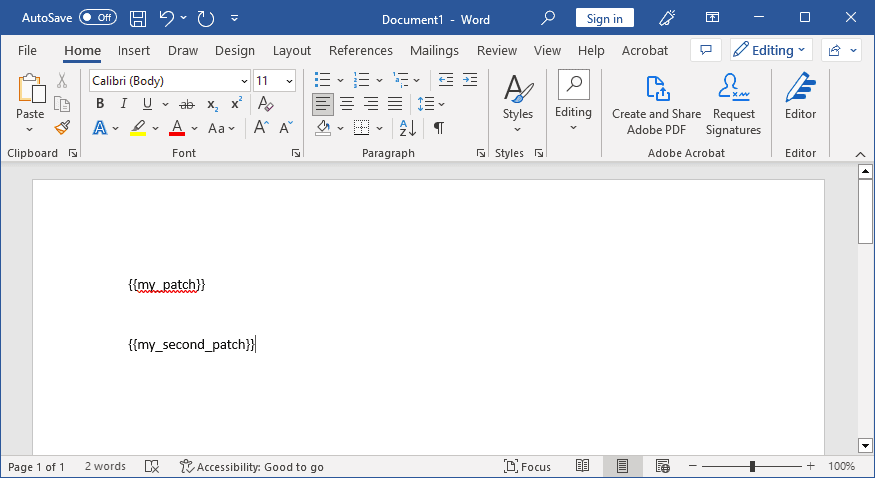
- Write tags in the document where you want to patch in a mustache style notation. For example,
{{my_patch}}and{{my_second_patch}}. - Run the patcher with the patches as a key value pair.
Example
Word Document
Patcher
Notice how there is no handlebar notation in the key.
The patch can be as simple as a string, or as complex as a table. Images, hyperlinks, and other complex elements within the docx library are also supported:
- Patched-in images may be
png,jpg/jpeg,bmp,gif, orsvg— the corresponding content types are registered in the document automatically. ExternalHyperlinkchildren are converted to concrete hyperlinks, and the required relationship entries are created for you.
await patchDocument({
    outputType: "uint8array",
    data: documentBuffer,
    patches: {
        my_patch: {
            type: PatchType.PARAGRAPH,
            children: [
                new TextRun("Sir. "),
                new TextRun("John Doe"),
                new TextRun("(The Conqueror)"),
            ],
        },
        my_second_patch: {
            type: PatchType.DOCUMENT,
            children: [
                new Paragraph("Lorem ipsum paragraph"),
                new Paragraph("Another paragraph"),
                new Paragraph({
                    children: [
                        new TextRun("This is a "),
                        new ExternalHyperlink({
                            children: [
                                new TextRun({
                                    text: "Google Link",
                                }),
                            ],
                            link: "https://www.google.co.uk",
                        }),
                        new ImageRun({
                            type: "png",
                            data: imageBuffer,
                            transformation: { width: 100, height: 100 },
                        }),
                    ],
                }),
            ],
        },
    },
});
Error Handling
TokenNotFoundError
When a placeholder token given in patches is not found anywhere in the document, patchDocument throws a TokenNotFoundError. The error carries the offending token on its token property, making it easy to report which placeholder was missing:
import { patchDocument, TokenNotFoundError, PatchType, TextRun } from "betterdocx";

try {
    await patchDocument({
        data: documentBuffer,
        outputType: "blob",
        patches: {
            my_patch: {
                type: PatchType.PARAGRAPH,
                children: [new TextRun("Hello World")],
            },
        },
    });
} catch (error) {
    if (error instanceof TokenNotFoundError) {
        console.error(`Token "${error.token}" was not found in the document`);
        // Handle token-specific error
    } else {
        throw error;
    }
}
Placeholders that exist in the document but have no corresponding patch are left untouched — the error only applies in the other direction. To build a patch map containing only the placeholders a template actually has (and avoid the error entirely), scan the document with patchDetector first.
Detecting Patches
patchDetector
Before patching a document, you may want to know which placeholders are actually present in the template. The patchDetector function scans a document and returns an array of all placeholder tokens it finds. This is especially useful when working with multiple templates that use different placeholders, or to avoid expensive operations for placeholders that don't exist in the current template.
import { patchDetector, patchDocument, PatchType, ImageRun } from "betterdocx";

const placeholders = await patchDetector({ data: documentBuffer });
// Returns: ['name', 'address', 'company_logo']

// Only prepare patches that are actually needed
const patches = {};
if (placeholders.includes("company_logo")) {
    patches.company_logo = {
        type: PatchType.PARAGRAPH,
        children: [
            new ImageRun({
                type: "png",
                data: logoImageBuffer,
                transformation: { width: 200, height: 100 },
            }),
        ],
    };
}

await patchDocument({
    data: documentBuffer,
    outputType: "blob",
    patches,
});
Custom Delimiters
If you're using custom placeholder delimiters, pass them to patchDetector to match:
const placeholders = await patchDetector({
    data: documentBuffer,
    placeholderDelimiters: {
        start: "<<",
        end: ">>",
    },
});
// Finds placeholders like <<name>>, <<address>>

await patchDocument({
    data: documentBuffer,
    outputType: "blob",
    patches,
    placeholderDelimiters: {
        start: "<<",
        end: ">>",
    },
});
Reading Styles
readStyleIds
On the patch path the template owns every style, and your code only references them by id. An id the template does not define is not an error: Word silently falls back to Normal when it opens the file, so a typo in a style id does not throw, does not warn, and ships as an unstyled document.
readStyleIds returns the w:styleIds a document defines, so you can check that contract up front:
import { readStyleIds } from "betterdocx";

const definedIds = new Set(await readStyleIds({ data: templateBuffer }));
// => ["Normal", "Heading1", "BrandTable1", "Hyperlink", ...]

const referenced = ["Heading1", "BrandTable1"];
const missing = referenced.filter((id) => !definedIds.has(id));

if (missing.length > 0) {
    throw new Error(`Template is missing style(s): ${missing.join(", ")}`);
}
This pairs well with patchDetector: one tells you which placeholders a template has, the other which styles it defines. Together they let a test assert a template satisfies everything your code expects of it, before any document is generated.
readStyles
When you need more than the ids, readStyles returns each style's name and type as well:
import { readStyles } from "betterdocx";

const styles = await readStyles({ data: templateBuffer });
// => [{ id: "BrandTable1", name: "Brand Table 1", type: "table" }, ...]

const tableStyles = styles.filter((style) => style.type === "table");
type is one of "paragraph", "character", "table" or "numbering", and is undefined when the style omits it (which per ECMA-376 implies a paragraph style). name is the human-readable name Word shows in its style gallery, and is undefined when the style declares none. Both functions return an empty array for a document with no word/styles.xml.
These read the styles a document defines, which on the patch path is what you want. They do not report which styles are actually used by the content.
Demo
Source: https://github.com/ddloophq/betterdocx/blob/main/demo/85-patch-document.ts